Unlimited Mind Map Levels
Build simple or complex mind maps with no depth limit. Create a main idea, add child bubbles, branch those bubbles into more ideas and continue expanding your map as far as your thinking goes.
YaviMind is a free online mind map creator for brainstorming, study notes and project plans. Connect your ideas, personalize them with styles and icons, and save or share your map from any modern browser.
No download or credit card. Sign in with your email and a one-time code, then start mapping.
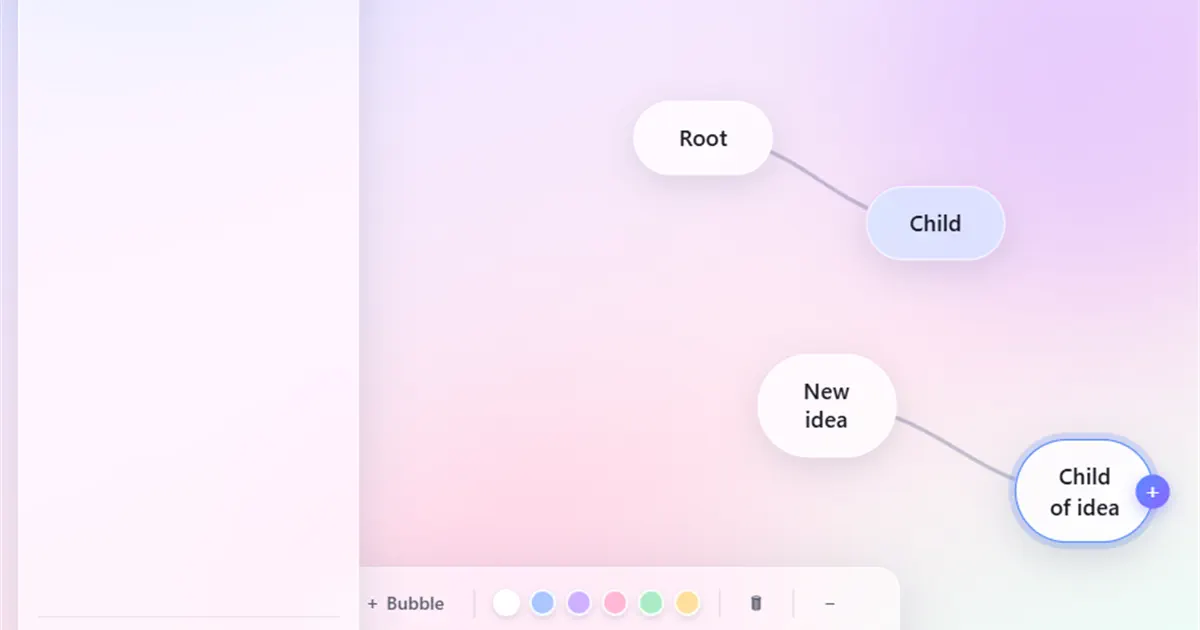
Start with one central idea and expand it into connected branches. Your free account includes multiple maps, unlimited branch levels, five visual styles, 128 searchable icons, cloud autosave and shared editing. Optional donations support hosting; there is no paid plan to unlock these features.
Sign in with an email code to keep your work together across desktop, tablet and mobile. Maps are private to your account until you share them by email. New to visual planning? Follow the step-by-step guide to making a mind map.
Map ideas quickly with unlimited branches, five visual styles, searchable bubble icons, automatic saving, sharing and touch-friendly controls.
Build simple or complex mind maps with no depth limit. Create a main idea, add child bubbles, branch those bubbles into more ideas and continue expanding your map as far as your thinking goes.
Create visual connections naturally. Double-click to add a bubble, drag the plus handle to create a child idea, or connect one bubble to another to show relationships between thoughts.
YaviMind automatically saves your mind map changes to the cloud. When you move bubbles, edit text, add connections or change colors, your work is saved quickly so you can return later without losing progress.
Share your mind map with others by email and work on the same canvas together. YaviMind supports shared editing, making it useful for brainstorming sessions, planning meetings, classroom activities and group projects.
Keep different maps for different projects, subjects, clients or ideas. Create, rename and manage your mind maps from one clean workspace.
Switch the entire map between Glass, Corporate, Minimal, Organic and Neon. Each style changes the canvas, bubbles and connections while preserving your ideas and layout.
Add a clear visual cue to any idea bubble. Search 128 transparent icons across planning, people, business, learning, technology, status, lifestyle and health categories.
Sign in securely using your name and email address, then enter the one-time 6-digit code sent to your inbox. No password to remember.
Use YaviMind in any modern browser. Create, edit, move and connect bubbles on desktop, tablet or phone, with two-finger pinch zoom on touchscreens.
Use an email code, add your first bubble and expand or share the map as your thinking develops.
Enter your name and email address, then type the one-time 6-digit code sent from hello@yavimind.io. You can start using YaviMind without creating or remembering a password.
Double-click anywhere on the canvas to create a new bubble. Add your main idea first, then branch out with related thoughts, tasks, notes or concepts. Recolor, move and rearrange bubbles freely as your ideas develop.
Invite others by email and build the mind map together. Team members can open the shared map, add ideas, edit content and organize thoughts on the same canvas while changes are saved automatically.
Choose a starting structure, put your topic in the center and add the branches that fit your work. Each guide below shows an example you can recreate in the editor.
Learn mind mapping
Learn the method first, then use practical examples to plan the branches of your own map.
Start with a focused central topic, choose useful main branches, add supporting details and refine the layout so the finished map is easy to scan and act on.
Read the step-by-step guide →See practical branch structures for studying, project planning, meetings, brainstorming, problem-solving, content planning and personal goals.
Explore the mind map examples →Learn focused methods for study notes, projects, brainstorming, essay plans and meetings, or compare mind maps with concept maps.
Browse all mind mapping blogs →Answers before you start mapping.
Yes. Creating maps, adding branch levels, choosing from five visual styles and 128 icons, cloud autosave and shared editing are all free. No subscription or credit card is required. Optional donations help cover hosting.
Yes. Register with your name and email address, then enter the one-time code sent to your inbox. Your free account keeps your maps together so you can return to them on another device and share them with collaborators.
Your maps are private to your account unless you share them by email. An invited collaborator must sign in with the email address you shared with to open and edit the map. The owner can remove that access.
A useful mind map starts with one clear central topic, uses short labels for its main branches, groups related details together and shows a visual hierarchy from broad ideas to specific points. Color can help distinguish categories, but the structure should remain easy to scan. See the complete seven-step method.
Yes. YaviMind works directly in your web browser on desktop, tablet and mobile. You do not need to download an app or install any software.
Sign in with your email and one-time code, create a new map and rename the central idea. Add connected child bubbles to expand your thoughts into a structured visual map.
Yes. You can share a mind map by email and edit with others on the same canvas. Changes sync automatically, making it useful for teams, students, trainers and project groups.
Yes. YaviMind can be used to break down projects into goals, tasks, categories, owners and action steps. The unlimited bubble structure helps you organize complex plans visually.
Yes. Students can create mind maps online for study notes, chapter summaries, revision and group projects. YaviMind is free in the browser, and each map saves automatically for later review.
Yes. YaviMind saves your changes automatically to the cloud, including text edits, bubble movement, new connections and layout changes.
Yes. YaviMind works in modern mobile browsers. You can pan the canvas, pinch with two fingers to zoom, drag bubbles and edit mind maps on phones and tablets.
YaviMind is useful for students, teachers, trainers, business owners, project managers, content creators, marketers, writers and teams that need a simple way to organize ideas visually.
Start with one bubble, connect your thoughts and build the big picture visually. YaviMind is free, browser-based and designed for fast idea mapping.
Create Your First Mind Map